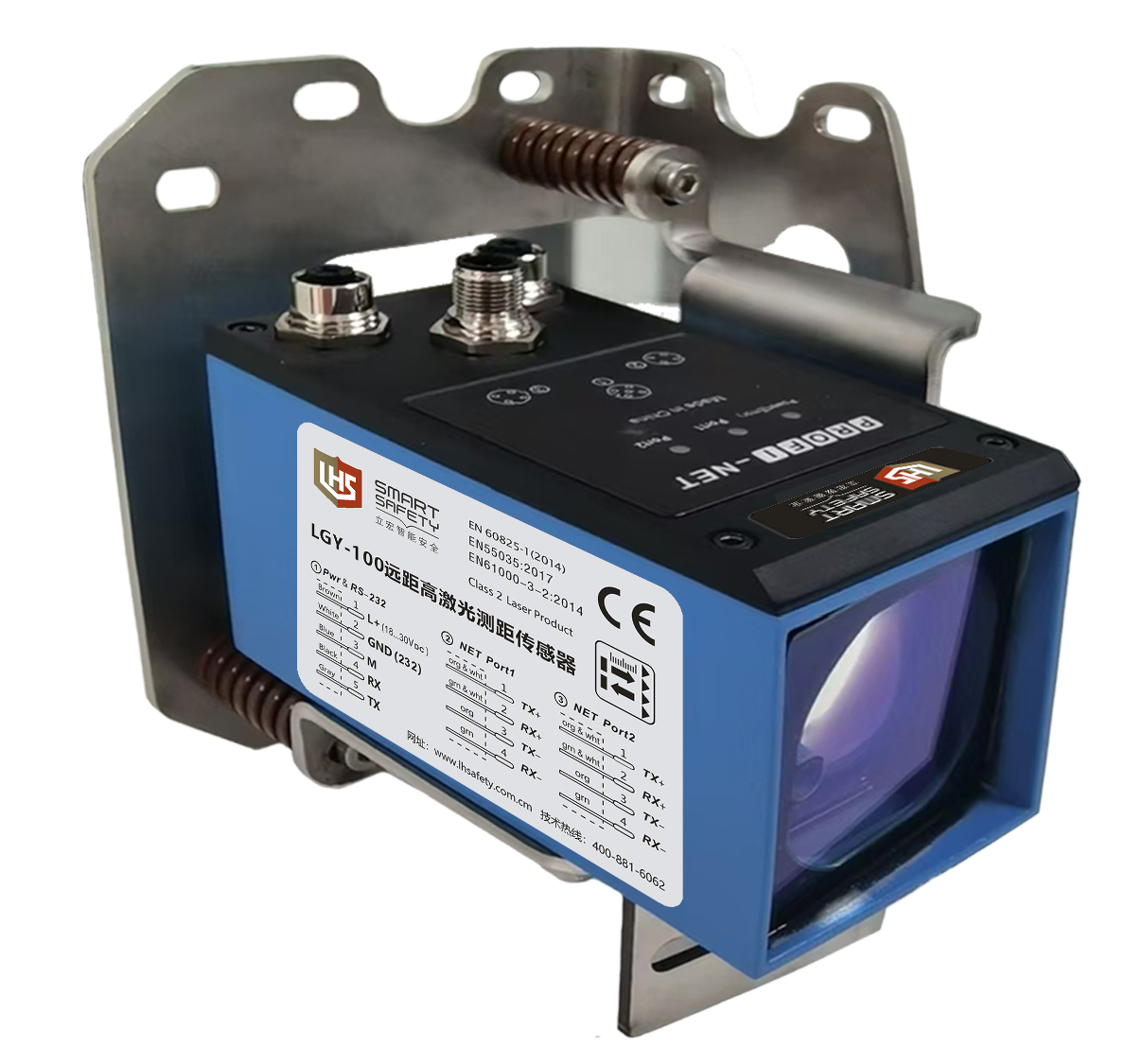
 | ·Visible red laser, easy to align and debug ·Support the movement speed of 10m/s. ·Support SSI, PROFINET, MODBUS RTU, RS422 and other interface outputs. ·TOF measurement principle ensures ultra-fast measurement speed and ultra-fast measurement frequency. ·High precision, which can better locate the position of moving objects accurately. |
| ▊ | Product selection table |
working distance | precision | frequency | joggle/interface | Working temperature | model |
0.2-100m | ±2mm | 200Hz | RS422 | –10℃...+50℃ | LGY-300-S |
200Hz | MODBUS RTU, RS232 | LGY-300-MS | |||
400Hz | SSI, RS232 | LGY-300-ES | |||
400Hz | PROFINET, RS232 | LGY-300-NS | |||
200Hz | RS422 | –40℃...+50 ℃ | LGY-300H-S | ||
200Hz | MODBUS RTU, RS232 | LGY-300H-MS | |||
400Hz | SSI, RS232 | LGY-300H-ES | |||
400Hz | PROFINET, RS232 | LGY-300H-NS |
| ▊ | technical parameter |
performance parameter | ||
measuring range | 0.2…300m | |
precision | ±2mm(90%reflectivity)@2σ | |
repeatability | 0.3mm | |
Measuring frequency | 200Hz | |
resolution ratio | 0.1mm | |
Measuring object | Reflective film | |
Laser spot | 6mm(10m) | |
Laser light source | Red laser | |
wavelength:650–690nm | ||
Pulse duration:3ns | ||
Beam divergence:0.16×0.6mrad | ||
Laser power:0.95mW | ||
Laser grade | Secondary laser | |
IEC 60825-1:2014, EN 60825-1:2014 | ||
Laser lifetime | 100'000h @ 25℃ | |
Interface parameters | ||
PROFINET | Network load level | II |
function | Measurement data output, parameter setting | |
RS-232 | Baud rate | 115200 |
data bit | 8 | |
Stop position | 1 | |
Check Digit | 無 | |
fluid control | 無 | |
function | Measurement data output, parameter setting | |
Mechanical/electronic parameters | ||
supply voltage | DC 18V…30V | |
power | <3.5W (在24VDC) | |
Initialization time | Typ. 5s | |
Connection type | A code 5-pin M12 plug | |
sheathing material | D-coded 4-pin M12 plug | |
Aluminum die casting | ||
the protection grades | IP65 | |
weight | 975g | |
measure | 129*69.5*92mm | |
Working temperature | -10℃…+50℃ | |
Storage temperature | -25℃…+75℃ | |
Electromagnetic compatibility (wireless) | EN 55032:2015,EN61000-3-2:2014,EN 61000-3-3:2013, EN 55035:2017 | |
| ▊ | Schematic diagram of pin distribution and wiring |
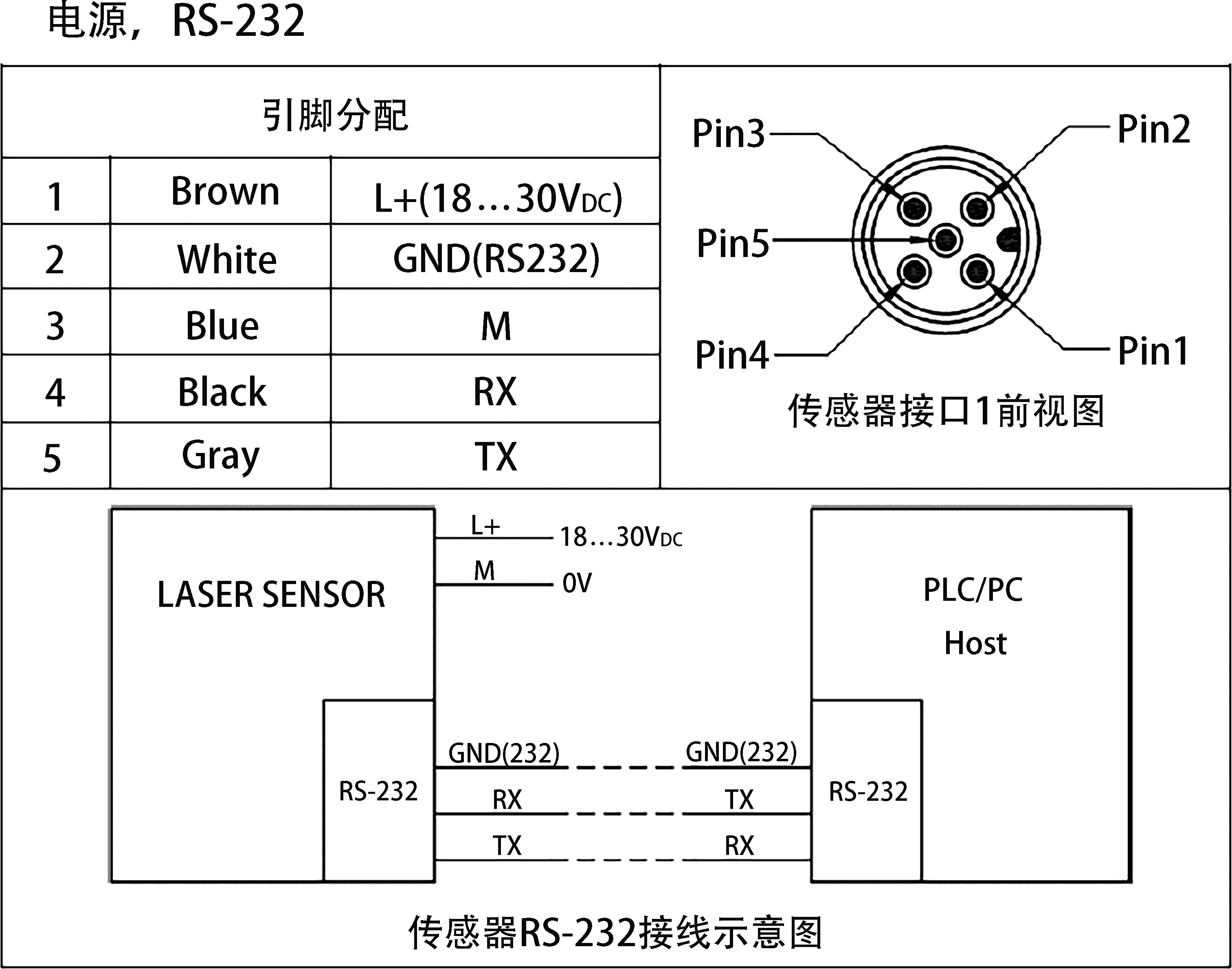 | 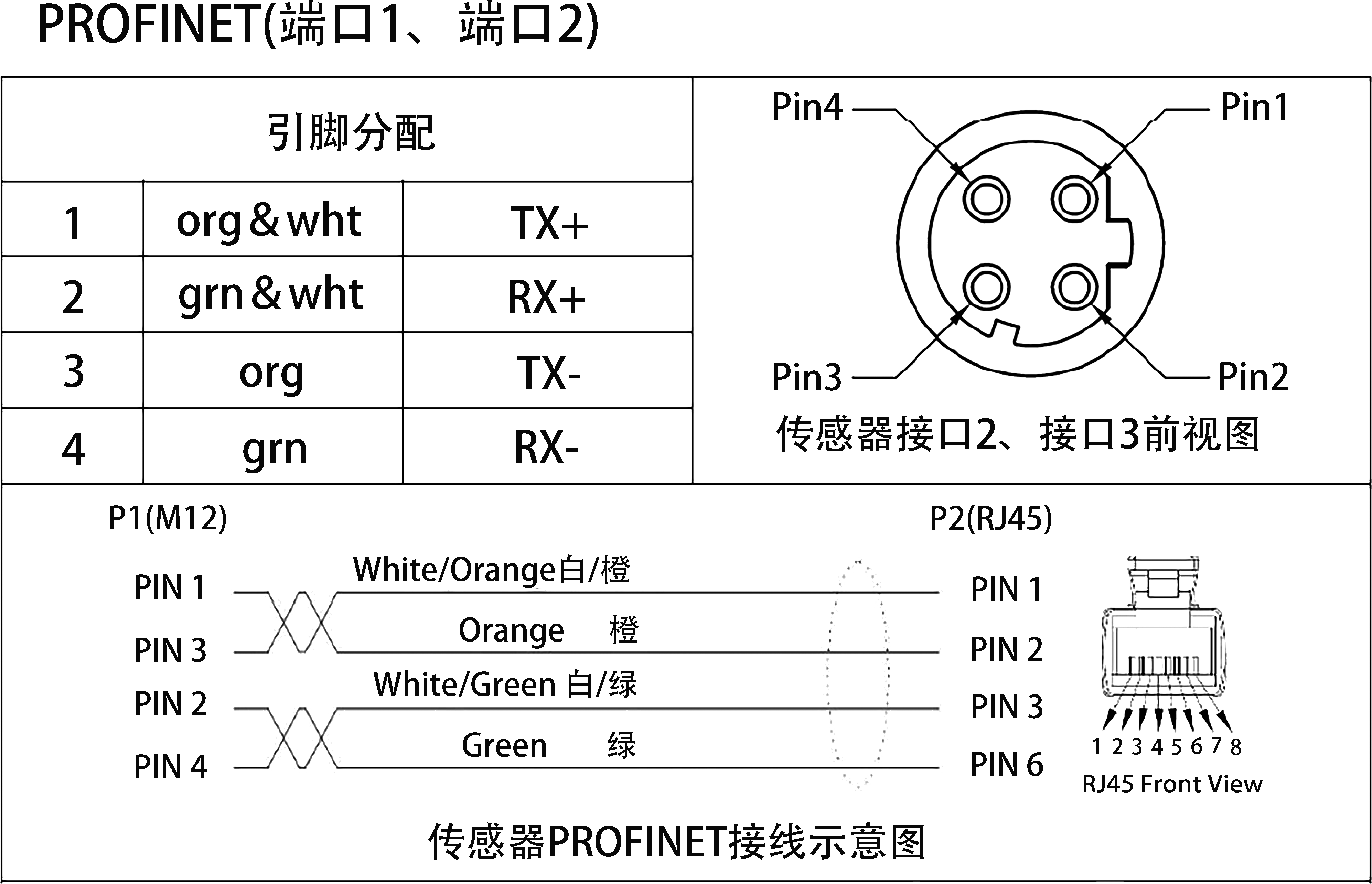 |
| ▊ | Error code description |
If there is an error code not listed in the table below, please contact our technical support.
serial number | format | meaning | debugging |
1 | @E203 | Wrong command or parameter | Check input instructions, parameters and communication settings. |
2 | @E220 | Communication error | Check and eliminate electromagnetic interference around sensors and communication lines. |
3 | @E234 | no to scale | Adjust the distance of the measured target to make it within the measuring range. |
4 | @E252 | The temperature is too high | Reduce the ambient temperature. If an error occurs at room temperature, please contact our technical support |
5 | @E253 | The temperature is too low. | Raise the ambient temperature. For sensors with heating function, wait for the heating temperature to rise. If an error occurs at room temperature, please contact our technical support |
6 | @E255 | The received signal is too weak | Improve the reflectivity of the measured target. |
7 | @E256 | The received signal is too strong | Reduce the reflectivity of the measured target. |
8 | @E257 | The background light is too noisy | Eliminate the clutter of background light |
9 | @E260 | There are multiple targets in the measurement, so it is impossible to measure the distance. | Determine the distance of the measured target and eliminate the phenomenon of target distance jump. |
10 | @E289 | Contact our technical support. | / |
| ▊ | Sensor indicator description |
The sensor status and PROFINET interface status are displayed by LED lights as described in the following table.
LED | explain | Possible cause of abnormality | debugging |
Port2 | PROFINET interface 2 LED lights green: normal operation LED off: the connection is disconnected. | The device did not shake hands with the master station. The sensor is damaged. | Contact our technical support. |
Port1 | PROFINET interface 1 LED lights green: normal operation LED off: the connection is disconnected. | The device did not shake hands with the master station. The sensor is damaged. | Contact our technical support. |
Power(Error) | Sensor status The LED lights green: the sensor is normal. The LED is red: the sensor is abnormal. | Not running. The sensor is damaged. | Check the operating voltage. Check the corresponding error code and eliminate the exception as instructed. Contact our technical support. |
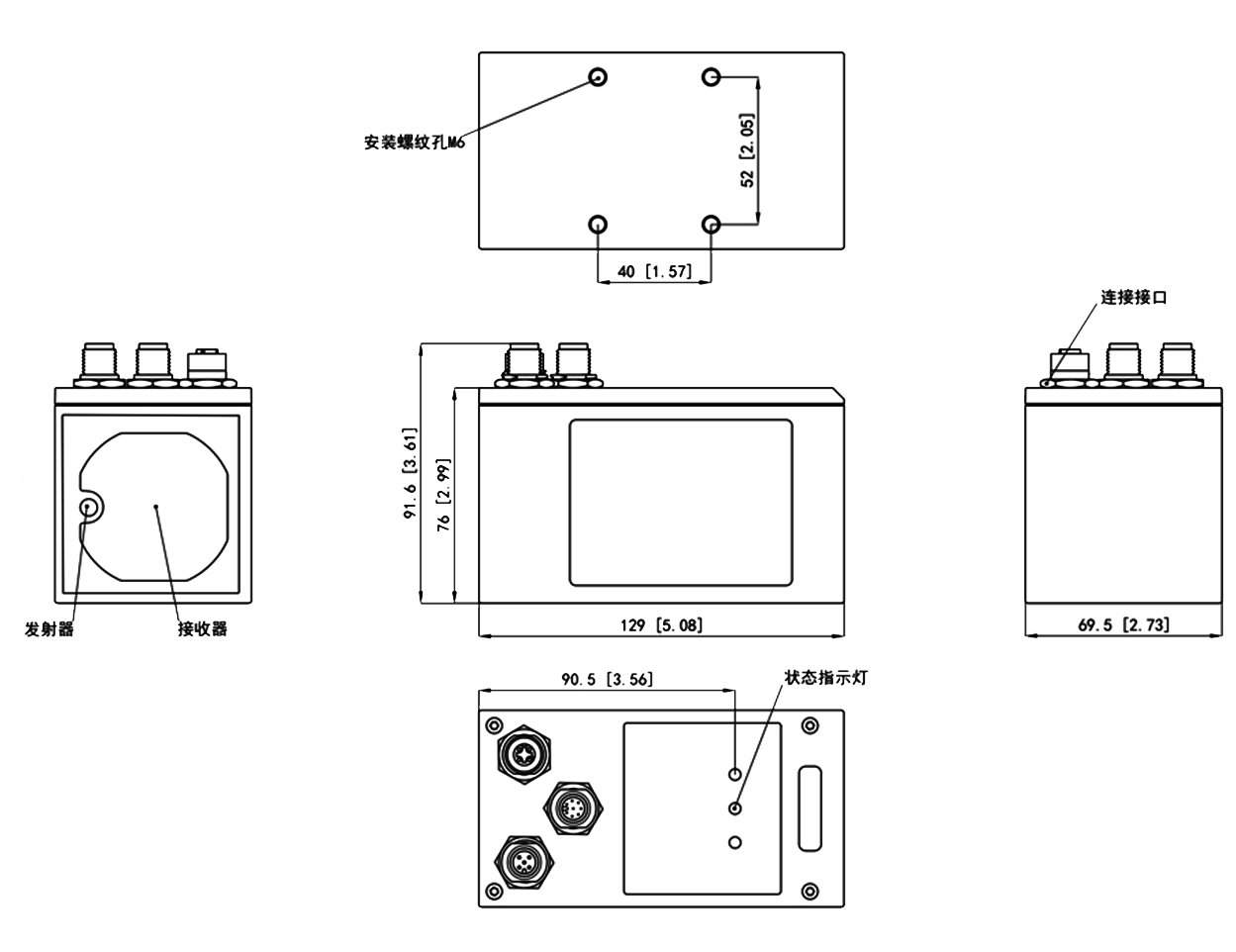
| ▊ | Product outline dimension diagram |

Lihong Safety Equipment Engineering (Shanghai) Co., Ltd.
E-Mail: info@lh-safety.com
Address: 581 Xiuchuan Road, Chuansha Town, Pudong New District, Shanghai
(Greenland East Coast International Plaza-Room A 313)
Copyright ? Lihong Safety Equipment Engineering (Shanghai) Co., Ltd. ICP19034341-1 Technical Support: lanjujing